How to Check Transfer Pending of E-Ticket
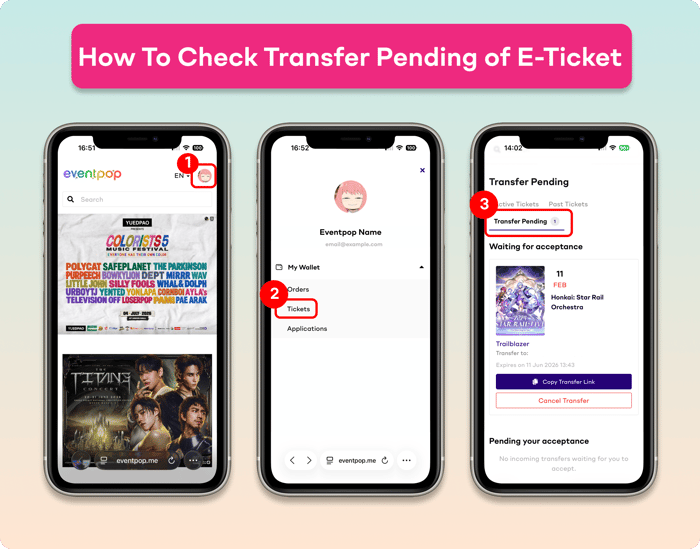
You can check the transfer Pending of the E-Ticket by following these instructions.
1. Go to Eventpop website. Then, log in to your account
2. Go to the menu My Wallet > Tickets
3. Go to "Transfer Pending". The E-Ticket will show on each menu as follows
- "Waiting for acceptance" for the customer who transferred the E-Ticket
- "Pending your acceptance" for the customer who will receive the E-Ticket
Remark :
- Once you transfer the E-ticket, the ticket transfer email and the confirm ticket receive button via the Eventpop website will be sent automatically. However, if the receiver doesn't receive the transfer link, you can copy the transfer link to them directly.
- If the ticket hasn't been received yet, you can cancel the ticket transfer on this page